
How eSIM Works: A Clear Guide for Travelers
What the eSIM chip is, what you actually download, what happens when you scan the QR code and how a travel eSIM gets you online abroad.
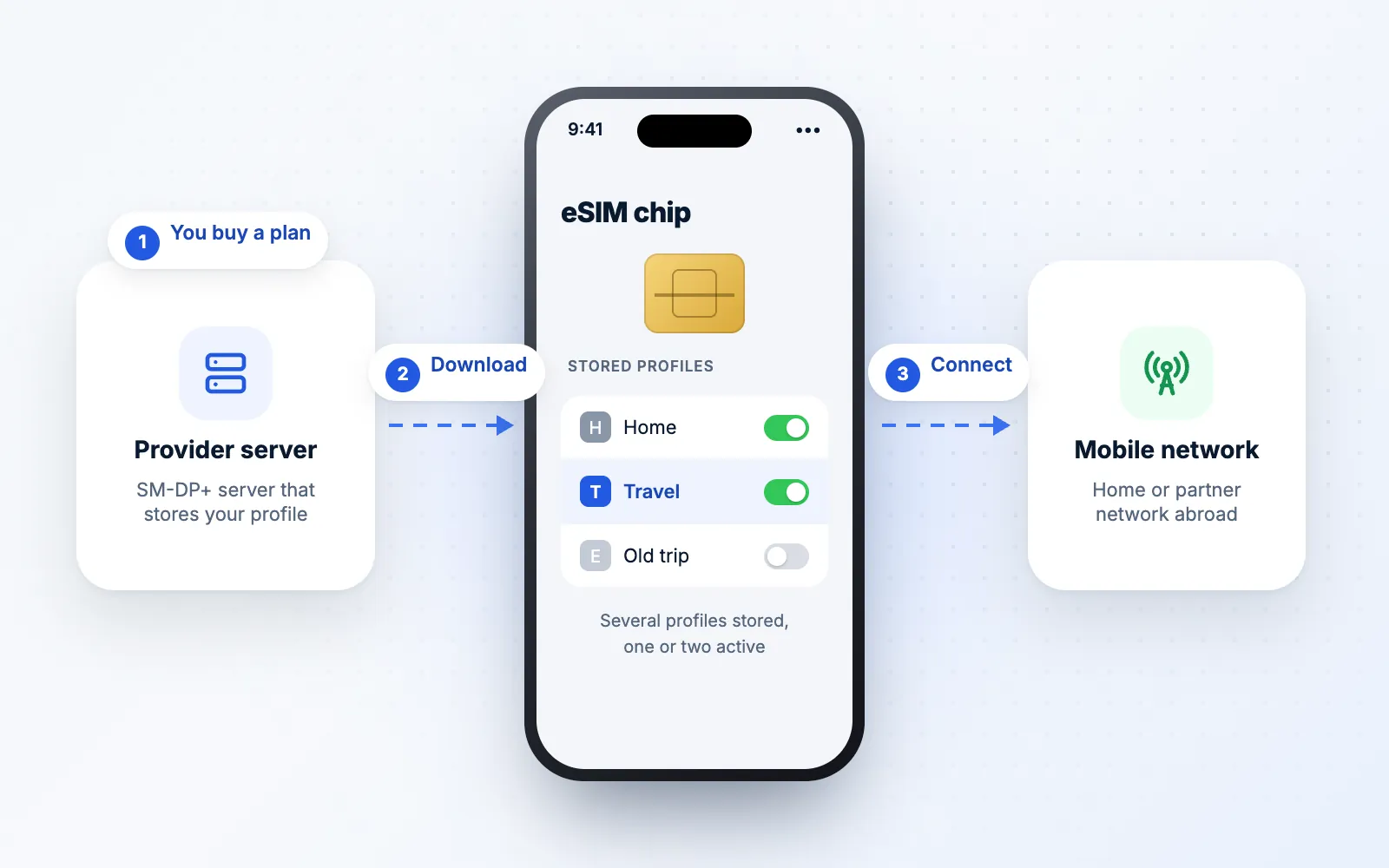
Quick answer
- An eSIM is a SIM chip built into your phone; you download a profile to it instead of inserting a card.
- One chip can store several profiles, but usually only one or two are active at a time.
- The QR code points your phone to the provider's server, which sends your profile in encrypted form.
- Profiles are usually released once, which is why deleting an eSIM is often permanent.
An eSIM does the same job as the plastic SIM card you've used for years: it tells a mobile network who you are and which plan you're on. The difference is how that information gets into your phone. Instead of a card you slide into a tray, it's a profile you download onto a chip that's already built in.
This guide explains what's going on behind the "Add eSIM" button: what the chip is, what you actually download, what happens when you scan a QR code, and how a travel eSIM gets you online abroad. You don't need any technical background, and you'll come away knowing why some eSIM rules (like "don't delete it") exist.
What an eSIM Actually Is
Every phone that connects to a mobile network needs a SIM. Its job is to identify your line to the network and prove that it's allowed to connect, using credentials that are stored securely and never shown to you.
With a physical SIM, those credentials live on a removable card. With an eSIM, they live on a small chip soldered onto the phone's circuit board. The "e" stands for embedded. The chip is often called an eUICC, which is the technical name for a SIM chip that can be rewritten with new profiles.
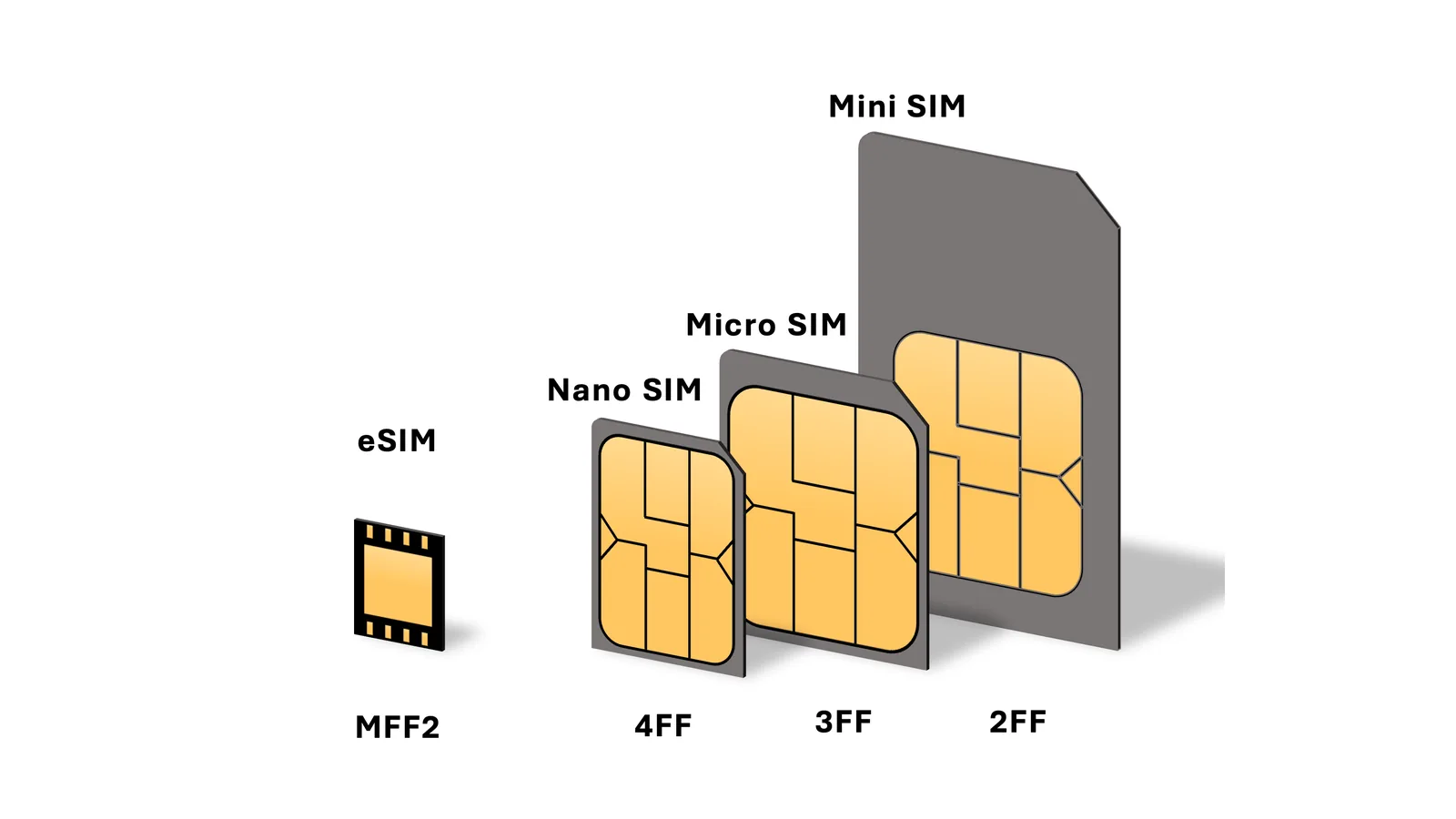
Because the chip can't be removed, you never swap it. You change what's stored on it instead.
Profiles: The Part You Download
What you download when you install an eSIM is called a profile. Think of it as the digital version of everything a SIM card would carry: the details that identify your line and the keys your phone uses to sign on to the network.
A few points make profiles easier to understand:
- One chip can hold several profiles. You might have your home carrier's line and two travel eSIMs stored at the same time.
- Only one or two can be active at once. Most phones run two lines at the same time at most, so the others sit switched off until you need them.
- Each profile has its own number, called an ICCID. It's the same kind of identifier printed on a physical SIM card, and providers use it to look up your plan.
- The chip has its own identifier too, called the EID. You can find it in your phone's settings (on iPhone under Settings → General → About). Some providers ask for it so they can prepare an eSIM for your specific phone.
What Happens When You Install an eSIM
When you buy an eSIM plan and install it, a short chain of events runs in the background:
- The provider prepares your profile. It's stored on the provider's secure server, called an SM-DP+ server, waiting for your phone to collect it.
- You receive an activation code. It usually comes as a QR code. The code holds the server's address and a unique reference for your profile.
- Your phone contacts the server. When you scan the code, the phone connects over the internet, identifies itself and asks for the matching profile.
- The profile downloads in encrypted form. It goes straight into the eSIM chip, and the server marks it as delivered.
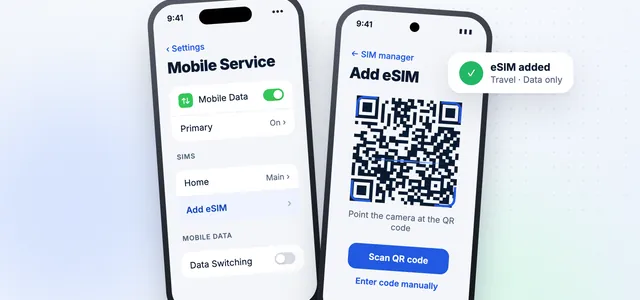
- A new line appears in your settings. You label it, choose what it's used for and switch it on when you need it.
- The phone connects to the network. From now on, it uses the profile's credentials to sign on, just as it would with a physical SIM.
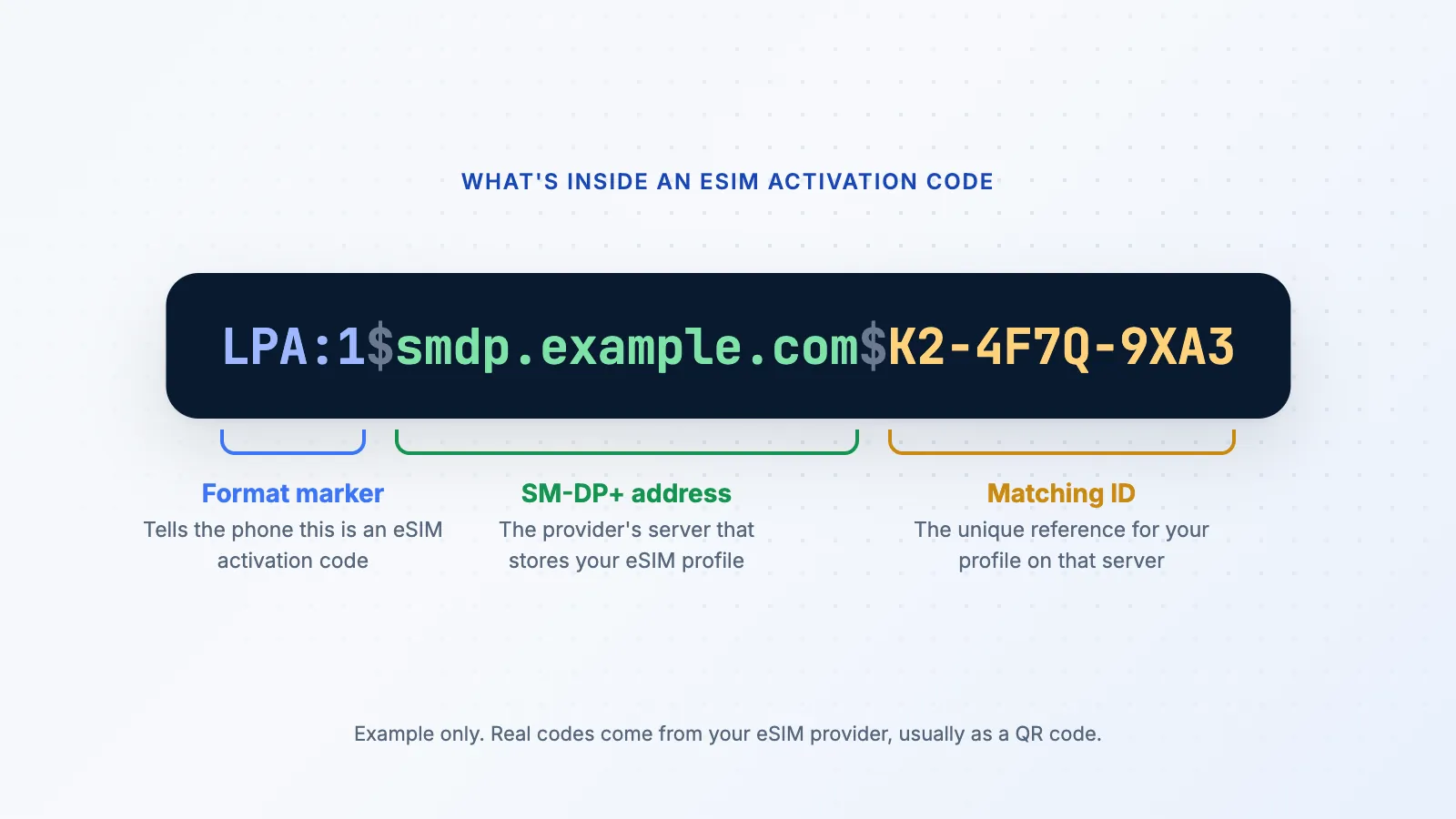
This is also why the familiar warnings exist. The profile is usually released once, to one device. Delete it, and there's often nothing left on the server to download again, which is why most providers say an eSIM can only be installed once.
The download process follows a standard set by the GSMA, the industry body for mobile operators. That shared standard is what lets an eSIM from one provider install on phones from many different makers.
How a Travel eSIM Connects Abroad
A travel eSIM profile belongs to a mobile operator, just like your home SIM. When you're abroad, your phone uses that profile to connect to a local network the operator has an agreement with. In many cases, the phone shows that it's roaming, because technically it is: it's a guest on a partner network.
That's why travel eSIMs often ask you to turn on data roaming for their line. It doesn't mean your home carrier will charge you, because the travel line is billed by the eSIM provider under the plan you bought. Our guide to eSIM roaming explains this in more detail.
Coverage depends on which partner network the profile connects to, so it's worth checking the network named in a plan before you buy, especially if you're heading somewhere remote.
Using an eSIM Alongside Your Physical SIM
Most phones that support eSIM are dual SIM phones. A common setup for travelers looks like this:
- Your home SIM (physical or eSIM) stays on for calls and texts, with data roaming switched off.
- Your travel eSIM handles mobile data, with data roaming switched on for that line.
You choose which line does what in your phone's SIM or mobile settings. Calls and texts that reach your home number while you're abroad are still handled by your home carrier, and its roaming rates may apply, so check them before you travel.
Is an eSIM Secure?
eSIMs have a few practical security advantages. There's no card for someone to slide out of a stolen phone and use elsewhere, and the profile download is encrypted and tied to your device.
That doesn't make an eSIM risk-free. A common mobile fraud, SIM swapping, works by tricking a carrier into moving your number to someone else's SIM or eSIM. It targets your carrier account rather than the chip itself, so the same advice applies whatever SIM you use: protect your carrier account with a PIN or password, and use an authenticator app rather than text messages for important logins where you can.
What an eSIM Can't Do
It's worth knowing the limits before you rely on one:
- It needs a compatible, unlocked phone. Older and some budget phones don't have an eSIM chip at all.
- Moving it to a new phone depends on the provider. Home carriers often support transfers; many travel eSIMs don't, so you'd buy a new plan instead.
- Deleting it is usually permanent. Keep the profile until you're sure you've finished with it.
- Many travel eSIMs are data-only. You get mobile data, but not a local phone number for calls or texts.
eSIM Terms at a Glance
| Term | What it means |
|---|---|
| eSIM | An embedded SIM chip, and the plans you download to it |
| eUICC | The technical name for the rewritable eSIM chip |
| Profile | The downloaded plan data that lets your phone use a network |
| EID | The unique identifier of the eSIM chip in your phone |
| ICCID | The identifier of a single SIM profile or card |
| SM-DP+ | The provider's server that stores profiles until your phone downloads them |
| Activation code | The details, usually in a QR code, that point your phone to its profile |
Ready to set one up? Our step-by-step guide shows how to install an eSIM on iPhone and Android.
Frequently asked questions
Does an eSIM need Wi-Fi to work?
Only to download it. Once it's installed, it connects to mobile networks just like a physical SIM, with no Wi-Fi needed.
Can I have more than one eSIM on my phone?
Yes. Most eSIM phones can store several profiles, though usually only one or two can be active at the same time.
Where do I find my phone's EID?
On iPhone, go to Settings → General → About. On Android, look under Settings → About phone, sometimes in a section called SIM status. Some providers ask for it before preparing your eSIM.
Is an eSIM the same as an eSIM plan?
Not quite. The eSIM is the chip in your phone. The plan, or profile, is what you download onto it from a provider.
Does an eSIM work in every country?
The chip works anywhere, but each profile only works where its provider has coverage or partner networks. That's why travel eSIMs list the countries and networks they cover.
Next step
Install your eSIM
Step-by-step instructions for iPhone and Android.
Install your eSIMData Roaming Editorial Team
We write practical, plain-English guides about using your phone abroad. Roaming prices and rules change, so we update guides regularly — always confirm current terms with your carrier. About our editorial approach

 USA
USA Japan
Japan France
 Europe
 Spain eSIM
 Italy eSIM
 Dubai eSIM
 UK eSIM
 Turkey eSIM