
Best eSIM for USA Travel in 2026
How to choose a USA eSIM: national networks, coverage on road trips and in national parks, data needs, the phone number question and setup.

Quick answer
- Choose a plan on a major national network; coverage differences show up in rural areas, deserts and national parks.
- Road trips usually use more data than city breaks, so size your plan for the longest days.
- Most travel eSIMs are data-only; buy a US SIM if you need a local number for texts.
- Download offline maps before visiting national parks or driving long rural routes.
The United States is big, and so are the distances between good signal and none at all. In New York or Los Angeles you'll rarely think about coverage; on a road trip through the desert or a national park, the network your eSIM uses can decide whether your maps keep working. Roaming from abroad is often expensive here too, so a travel eSIM is worth getting right.
This guide explains what to look for in the best eSIM for USA travel: networks and coverage, how much data a typical trip needs, the phone-number question and how to set everything up before you fly.
The Short Answer
For most visitors, the best eSIM for the USA is a plan on a major national network with enough data for your whole stay. Coverage matters more here than in smaller countries, especially if you're driving between cities or visiting national parks. If you need a US phone number for calls and texts, check that before you buy, because most travel eSIMs are data-only.
USA eSIM Plans at a Glance
United States eSIM plans on Data Roaming
Live prices in US dollars
1 GB · 7 days
Verizon, AT&T
3 GB · 30 days
Verizon, AT&T
10 GB · 30 days
Verizon, AT&T
15 GB · 30 days
Verizon, AT&T
50 GB · 30 days
Verizon, AT&T
100 GB · 10 days
Verizon, AT&T
| Data | Validity | Network | Price | Buy |
|---|---|---|---|---|
| 1 GB | 7 days | Verizon, AT&T | $1.66 | Buy |
| 3 GB | 30 days | Verizon, AT&T | $4.54 | Buy |
| 10 GB | 30 days | Verizon, AT&T | $12.08 | Buy |
| 15 GB | 30 days | Verizon, AT&T | $17.00 | Buy |
| 50 GB | 30 days | Verizon, AT&T | $56.00 | Buy |
| 100 GB | 10 days | Verizon, AT&T | $139.80 | Buy |
Prices come from our live catalogue and update automatically. Every plan shown allows hotspot use.
See all 20 plansAt the time of writing, our USA plans connect through Verizon and AT&T, two of the country's three national networks (the third is T-Mobile). Each plan lists its networks, data allowance and validity before you buy.
What Makes an eSIM Good for the USA
A strong national network
The US has three national networks: AT&T, T-Mobile and Verizon. All three cover the cities well; the differences show up in rural areas, mountains and deserts, where one network may have signal and another may not. A plan that can use more than one network gives you a better chance in remote areas.
Enough data for long drives
Navigation, streaming music on the road and looking up places to eat all add up. Road trips tend to use more data than city breaks, so size your plan for the longest days, not the average ones.
Validity for longer trips
Many visitors stay two or three weeks, or longer. Our USA plans range from a week to several months, so choose one that covers your whole stay rather than topping up repeatedly.
Hotspot use
If you're traveling with a laptop or sharing data in the car, check that hotspot use is allowed. Every plan in the table above allows it.
Coverage Across the United States

Coverage in and around cities, along interstates and in most towns is generally strong on all three national networks. The gaps are in the wide-open spaces: large parts of national parks, desert highways, mountain passes and rural areas in states such as Alaska, Montana and Nevada.
That doesn't mean you'll be cut off for long, but it does mean planning ahead:
- Download offline maps for each park and long drive before you set off.
- Save your hotel and car rental confirmations to your phone.
- Check park websites for where you can expect signal and Wi-Fi.
If your trip includes Canada or Mexico, look at a North America plan that lists all the countries you'll visit. US territories such as Puerto Rico may also be listed separately from the mainland, so check your plan if you're heading there.
How Much Data Do You Need in the USA?
Start with your own phone: check your mobile data use for a typical week, divide by seven, then adjust for travel. Road trips with navigation and streaming music usually use more than city breaks.
As a worked example, two weeks at roughly 1GB a day comes to about 14GB, so a plan with 15 to 20GB leaves room for the occasional video call. To make data go further:
- Download playlists and podcasts before long drives.
- Use Wi-Fi at hotels for photo backups and app updates.
- Turn off video autoplay in social media apps.
eSIM vs Roaming vs a Local SIM in the USA
Roaming with your home carrier is the easiest option, but rates to the US can be high unless your plan includes it. Check the daily cost and any data limits before you go. Our guide to data roaming charges explains what to look for.
A US prepaid SIM gives you a local number for calls and texts, which can help if you'll be booking restaurants, ride-shares or services that verify by text. You'll need to buy it after you arrive and swap it into your phone.
A travel eSIM gives you data from the moment you land, without a shop visit and with your home SIM still active for calls and texts. Most travel eSIMs are data-only, so calls and messages go through apps such as WhatsApp or FaceTime.
Setting Up Your USA eSIM
- Check that your phone supports eSIM and is unlocked.
- Buy a plan that covers your whole stay.
- Install it at home on Wi-Fi before you fly.
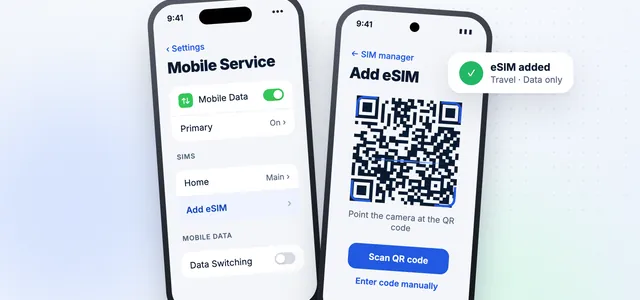
- When you land, switch the eSIM on, set it as your mobile data line and turn on data roaming for that line.
- Keep data roaming off on your home SIM.
Install before you leave
Airport Wi-Fi can be slow or need a sign-up. Installing at home means you can order a ride or check directions as soon as you land.
Our step-by-step guide shows how to install an eSIM on iPhone and Android.
Tips for Staying Connected in the USA
- Plan for national parks. Download maps and trail information before you lose signal.
- Think about the phone number question. If you need a US number for verification texts, a data-only eSIM won't provide one.
- Use Wi-Fi where it's free. Hotels, cafés and many public libraries offer Wi-Fi, which saves data for the road.
- Check time-sensitive bookings. Keep confirmation emails and QR codes saved offline in case you're out of signal at check-in.
Frequently asked questions
Which network is best for an eSIM in the USA?
AT&T, T-Mobile and Verizon all cover the cities well. Differences show up in remote areas, so if you're heading to national parks or rural regions, a plan that can use more than one network helps.
Do I get a US phone number with a travel eSIM?
Usually not. Most travel eSIMs are data-only. Calls and messages go through apps such as WhatsApp or FaceTime, and your home number can stay active on your physical SIM.
Will my eSIM work in national parks?
Often near visitor centers and in some areas, but large parts of many parks have little or no signal on any network. Download maps and trail information before you go.
Does a USA eSIM work in Canada or Mexico?
Only if the plan lists them. For a trip across North America, choose a regional plan that covers every country on your route.
How much data do I need for two weeks in the USA?
It depends on your habits. At around 1GB a day, two weeks comes to about 14GB, so a 15 to 20GB plan leaves room for extras. Check your own daily use for a better estimate.
Next step
See USA eSIM plans
Compare plans by network, data and validity.
See USA eSIM plansData Roaming Editorial Team
We write practical, plain-English guides about using your phone abroad. Roaming prices and rules change, so we update guides regularly — always confirm current terms with your carrier. About our editorial approach

 USA
USA Canada
 Mexico
 North America
 Japan eSIM
 France eSIM
 Spain eSIM
 Italy eSIM
 Dubai eSIM
 UK eSIM
 Turkey eSIM