
Best eSIM for Dubai and UAE Travel in 2026
How to choose a Dubai eSIM: networks, sizing your data, the app calling rules in the UAE, coverage in the desert, and setup before you fly.

Quick answer
- Coverage is excellent across Dubai, Abu Dhabi and Sharjah, including the metro and malls.
- Data in the UAE costs more per gigabyte than in many countries, so size your plan carefully.
- WhatsApp messages work, but voice and video calls through some apps, including WhatsApp, are restricted.
- Plan ahead for desert safaris and mountain areas, where signal can drop.
Dubai and the rest of the UAE have excellent mobile coverage, from the Dubai Metro to the top of the tallest towers. The things that catch visitors out are different: data costs more than in many countries, and internet calling works differently from what you're used to at home.
This guide covers how to choose the best eSIM for Dubai and the UAE: networks, how much data to buy, the app calling rules, coverage in the desert, and the apps that make getting around easier.
The Short Answer
For most visitors, the best eSIM for Dubai is a data plan on a UAE network, sized carefully for your trip, with a validity that starts when you arrive. Data in the UAE costs more per gigabyte than in many destinations, so it pays to estimate your usage rather than buy the biggest plan by default.
Dubai eSIM Plans at a Glance
Dubai (United Arab Emirates) eSIM plans on Data Roaming
Live prices in US dollars
1 GB · 7 days
Du
2 GB · 15 days
Du
3 GB · 30 days
Du
10 GB · 30 days
Du
20 GB · 30 days
Du
50 GB · 180 days
Du
| Data | Validity | Network | Price | Buy |
|---|---|---|---|---|
| 1 GB | 7 days | Du | $3.50 | Buy |
| 2 GB | 15 days | Du | $7.00 | Buy |
| 3 GB | 30 days | Du | $9.58 | Buy |
| 10 GB | 30 days | Du | $26.00 | Buy |
| 20 GB | 30 days | Du | $48.00 | Buy |
| 50 GB | 180 days | Du | $120.00 | Buy |
Prices come from our live catalogue and update automatically. Every plan shown allows hotspot use.
See all 11 plansAt the time of writing, our UAE plans connect through du, one of the country's two main networks, with 4G and 5G where available. The same plans work across the UAE, including Abu Dhabi and Sharjah.
How to Choose the Best Dubai eSIM
Coverage won't be the problem
The UAE's two networks, du and e& (formerly Etisalat), both cover the cities, highways, malls and the metro very well. For a Dubai and Abu Dhabi trip, you'll have a strong signal almost everywhere you go.
Size your data carefully
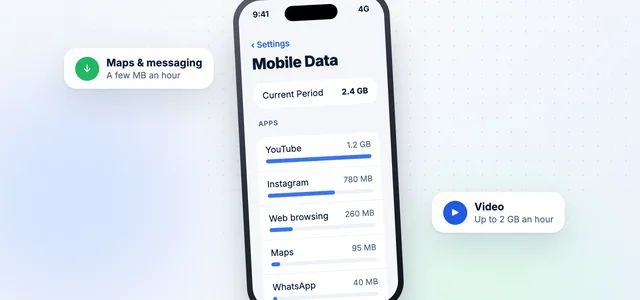
On our catalogue, UAE plans cost more per gigabyte than plans for most European and Asian countries. That makes it worth estimating your usage: maps, ride-hailing and messaging use little, while video calls and streaming use a lot. Hotel and mall Wi-Fi can take the heavy lifting. Our guide to how much data you need helps you size it.
Match validity to your dates
Our UAE plans run from a week to six months. Choose one that covers your whole stay, and check whether it starts counting days when you install it or when it first connects in the UAE.
Know you won't get a UAE phone number
Like most travel eSIMs, ours are data-only, so they don't include a UAE phone number. Every UAE plan in the table above allows hotspot use, so you can share your connection with a laptop or a travel companion.
Calling Apps Work Differently in the UAE
This is the biggest surprise for many visitors. Messaging apps such as WhatsApp work normally for texts, photos and voice notes, but voice and video calls through some internet apps, including WhatsApp, are restricted in the UAE.
Apps such as Botim, Zoom and Microsoft Teams are commonly used for calls instead. The rules have changed over the years, so check before your trip if you're relying on app calls to keep in touch, and download any app you plan to use before you fly.
This applies to any connection
The calling restrictions apply on UAE networks and public Wi-Fi alike, so they're not specific to a travel eSIM. Normal phone calls on your home number still work, at your carrier's roaming rates.
Coverage Beyond the City

In Dubai, Abu Dhabi and Sharjah, coverage is excellent, including in the metro and inside the big malls. On the main highways between the emirates it's reliable too.
The places to plan for are desert safaris and camps deep in the dunes, and mountain areas such as Hatta and Jebel Jais, where signal can be patchy. Save your booking details and pickup location as screenshots, and download offline maps before you head out.
Apps Worth Downloading Before You Go
- Careem and Uber both work for rides, and Careem also handles food delivery and more.
- S'hail, from Dubai's Roads and Transport Authority, plans trips on the metro, tram and buses.
- Google Maps works well for directions across the UAE.
Free Wi-Fi is easy to find in malls, at the airport and on the metro, which helps keep your data use down.
eSIM vs Local SIM vs Roaming
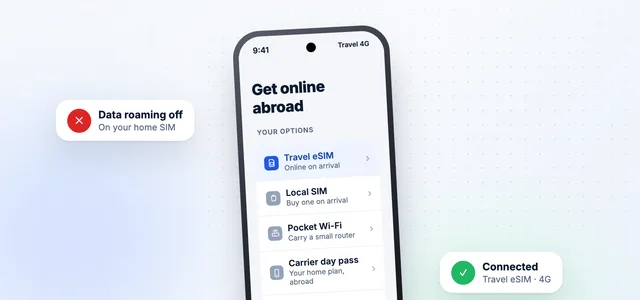
An eSIM suits most visitors with recent, unlocked phones: install it at home, and you're online when you land, with your home SIM still in the phone.
A local tourist SIM is available at the airport and in shops, and needs your passport to register. It can be good value for longer stays, but takes time after a long flight.
Roaming with your home carrier is the least effort, but rates to the UAE can be high. Check the price and any data limits first. Our guide to getting internet abroad compares the options.
Visiting Other Countries Too?
A UAE plan only works in the UAE. If you're combining Dubai with Oman, Saudi Arabia, Qatar or other countries in the region, look at regional plans that list every stop on your route, and compare their price with buying separate country plans.
Setting Up Your Dubai eSIM
- Check that your phone supports eSIM and is unlocked.
- Buy a plan that covers your whole stay.
- Install it at home on Wi-Fi a day or two before you fly.
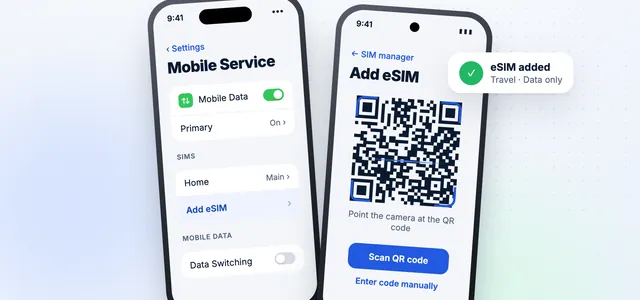
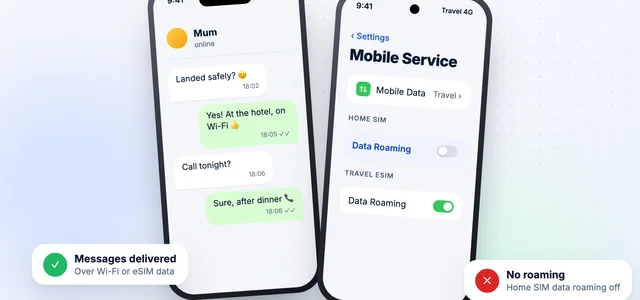
- When you land at Dubai International, Abu Dhabi or Sharjah, switch the eSIM on, set it as your mobile data line and turn on data roaming for that line.
- Keep data roaming off on your home SIM.
Our step-by-step guide shows how to install an eSIM on iPhone and Android.
Tips for Staying Connected in the UAE
- Use Wi-Fi for heavy data. Malls, hotels and the metro have it, and it saves your mobile data for when you're out.
- Carry a power bank. Heat, navigation and photos drain batteries quickly.
- Download your calling app before you fly if you'll need one for voice or video calls.
- Keep your home number reachable if you need bank security codes: leave your home SIM on with data roaming off.
Frequently asked questions
Which network do Dubai eSIMs use?
The UAE has two main networks, du and e&. At the time of writing, our UAE plans use du, which covers the cities, highways and metro very well.
Can I make WhatsApp calls in Dubai?
WhatsApp messages and voice notes work, but WhatsApp voice and video calls are restricted in the UAE. Apps such as Botim, Zoom and Microsoft Teams are commonly used for calls instead. Check the current rules before you travel.
Does a Dubai eSIM work in Abu Dhabi?
Yes. Our plans cover the whole of the UAE, including Abu Dhabi, Sharjah and the other emirates.
Do Dubai eSIMs include a phone number?
Most travel eSIMs, including ours, are data-only. Use messaging apps, and ask your hotel for help if a booking needs a UAE number.
How much data do I need for a week in Dubai?
With hotel and mall Wi-Fi for heavy use, 3 to 5 GB covers maps, rides and messaging for most visitors. If you'll stream or make video calls on mobile data, choose more.
Next step
See UAE eSIM plans
Compare plans by data, validity and price.
See UAE eSIM plansData Roaming Editorial Team
We write practical, plain-English guides about using your phone abroad. Roaming prices and rules change, so we update guides regularly — always confirm current terms with your carrier. About our editorial approach
 Dubai
 Middle East & N. Africa
 Turkey
 Egypt
 USA eSIM
 Japan eSIM
 France eSIM
 Spain eSIM
 Italy eSIM
 UK eSIM