
Best eSIM for South Korea Travel in 2026
How to choose a South Korea eSIM: networks, data and validity, the phone number question, the apps that work better in Korea, and setup before you fly.

Quick answer
- Coverage is excellent across Korea's cities and transport, so the network matters less than the plan size.
- Our South Korea plans run for 7 to 30 days, and most only start when they first connect in Korea.
- Travel eSIMs are data-only; some Korean apps and websites ask for a Korean phone number.
- Google Maps is limited in Korea, so download Naver Map or KakaoMap before you go.
South Korea has some of the fastest and most widespread mobile coverage in the world, from the Seoul subway to the KTX high-speed trains. That makes choosing an eSIM less about finding signal and more about choosing the right plan, and knowing which apps to use once you're there.
This guide covers how to choose the best eSIM for South Korea: networks, data, validity, the phone number question, and the local apps that work better than the ones you use at home.
The Short Answer
For most visitors, the best eSIM for South Korea is a data plan on one of the major Korean networks, with enough data for your trip and a validity that starts when you arrive. Install it at home, switch it on when you land at Incheon or Gimpo, and download Naver Map or KakaoMap before you go.
South Korea eSIM Plans at a Glance
South Korea eSIM plans on Data Roaming
Live prices in US dollars
1 GB · 7 days
SKTelecom, LG Uplus
2 GB · 15 days
SKTelecom, LG Uplus
3 GB · 30 days
SKTelecom, LG Uplus
10 GB · 30 days
SKTelecom, LG Uplus
20 GB · 30 days
SKTelecom, LG Uplus
50 GB · 30 days
SKTelecom, LG Uplus
| Data | Validity | Network | Price | Buy |
|---|---|---|---|---|
| 1 GB | 7 days | SKTelecom, LG Uplus | $1.40 | Buy |
| 2 GB | 15 days | SKTelecom, LG Uplus | $2.40 | Buy |
| 3 GB | 30 days | SKTelecom, LG Uplus | $3.60 | Buy |
| 10 GB | 30 days | SKTelecom, LG Uplus | $9.40 | Buy |
| 20 GB | 30 days | SKTelecom, LG Uplus | $16.40 | Buy |
| 50 GB | 30 days | SKTelecom, LG Uplus | $48.00 | Buy |
Prices come from our live catalogue and update automatically. Every plan shown allows hotspot use.
See all 16 plansAt the time of writing, our South Korea plans connect through SK Telecom and LG Uplus, with 4G and 5G where available. Each plan lists its network before you buy.
How to Choose the Best South Korea eSIM
Don't worry too much about the network
South Korea's three networks, SK Telecom, KT and LG Uplus, all cover the cities, the main transport routes and the tourist areas very well. For a Seoul, Busan and Jeju trip, the network makes little difference. It matters more in mountain valleys and on remote coastlines, where any network can be patchier.
Size your data for maps and translation
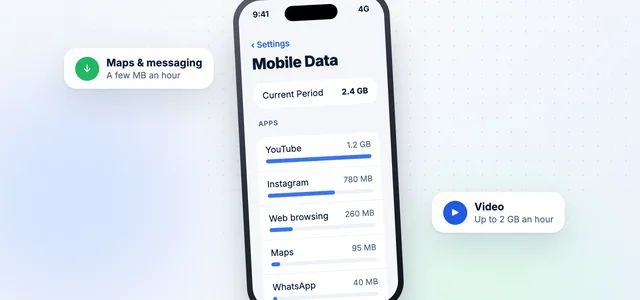
A Korea trip uses data steadily: map directions, subway routes, translating menus and signs, and looking up opening hours. None of it is heavy on its own, but it adds up over a long day. Video calls and streaming are what really use data, so plan for those separately.
Match validity to your dates
Our South Korea plans run for 7, 15 or 30 days. Most start counting days when they first connect in Korea, so you can install them before you fly without losing any days. Each plan shows when it starts.
Know that you won't get a Korean phone number
Like most travel eSIMs, ours are data-only, so they don't include a Korean phone number. That's fine for messaging, maps and most apps, but some Korean websites and apps ask for a Korean number to verify your account. If a booking needs one, ask your hotel to help or look for an option that accepts international numbers.
Every South Korea plan in the table above allows hotspot use, so you can share your connection with a laptop or a travel companion's phone.
Maps and Apps That Work Differently in Korea
The biggest surprise for many visitors isn't the eSIM, it's the apps:
- Google Maps is limited in South Korea. It shows public transport routes, but walking and driving directions are limited. Most travelers use Naver Map or KakaoMap, which both have English menus.
- KakaoTalk is the messaging app most Koreans use, and many shops, tours and guesthouses use it to keep in touch.
- Kakao T is the main app for booking taxis.
- Papago, Naver's translation app, is popular for Korean, including translating text with your camera.
Download your apps before you fly
Install Naver Map or KakaoMap and a translation app at home on Wi-Fi, and save your hotel's address in Korean. Showing it to a taxi driver is quicker than spelling it out.
Coverage Beyond Seoul

In Seoul, Busan, Incheon and the other big cities, coverage is excellent, including underground in the subway. On KTX high-speed trains, data is usually reliable, with brief drops in long tunnels. Jeju Island is well covered around its towns and coast roads.
The places to plan for are national parks such as Seoraksan and Jirisan, deep mountain valleys and some smaller islands. If your trip includes any of those, download offline maps for the area before you set off, and save trail information as screenshots.
How Much Data Do You Need in South Korea?
The best estimate comes from your own usage. Check how much mobile data you use in a typical week at home, divide by seven, and add a little for the extra navigation and translation you'll do in Korea.
As a worked example, if you average around 700 MB a day, a 10-day trip comes to about 7 GB. Add a buffer for days with video calls or lots of photo sharing, and a 10 GB plan gives you comfortable room. Our guide to how much data you need has plan sizes for other trip lengths.
eSIM vs Pocket Wi-Fi vs Roaming
An eSIM suits solo travelers and couples with recent, unlocked phones: nothing to collect or return, and data as soon as you land.
Pocket Wi-Fi, often called an "egg" in Korea, can be picked up at Incheon Airport. It suits families and groups who stay together, but it's another device to charge, and everyone needs to stay in range. Our travel eSIM vs portable Wi-Fi comparison covers the trade-offs.
Roaming with your home carrier is the least effort, but daily rates to South Korea can be high. Check the price and any data limits before you rely on it.
Visiting Japan or Other Countries Too?
A South Korea plan only works in South Korea. If you're combining Korea with Japan or other countries in Asia, a regional plan that lists every country on your route is usually simpler than buying one plan per country. Our guide to the best eSIM for Asia explains how regional plans work.
Setting Up Your South Korea eSIM
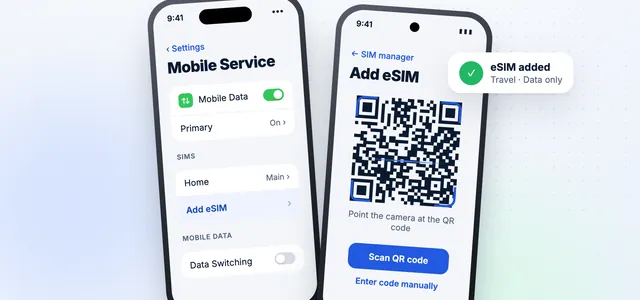
- Check that your phone supports eSIM and is unlocked.
- Buy a plan that covers your whole stay.
- Install it at home on Wi-Fi a day or two before you fly.
- When you land at Incheon, Gimpo, Gimhae or Jeju, switch the eSIM on, set it as your mobile data line and turn on data roaming for that line.
- Keep data roaming off on your home SIM.
Our step-by-step guide shows how to install an eSIM on iPhone and Android.
Tips for Staying Connected in South Korea
- Use free Wi-Fi as a backup. You'll find it in many subway stations, cafés, hotels and public places, but sign-up pages and speeds vary.
- Carry a power bank. Navigation, translation and photos drain batteries quickly on a long day out.
- Turn on emergency alerts. Korea sends emergency and weather alerts to phones on its networks, so keep them switched on in your notification settings.
- Keep your home number reachable if you need bank security codes: leave your home SIM on with data roaming off.
Frequently asked questions
Which network is best for an eSIM in South Korea?
SK Telecom, KT and LG Uplus all cover the cities and tourist areas very well. At the time of writing, our South Korea plans use SK Telecom and LG Uplus.
Does Google Maps work in South Korea?
Partly. It shows public transport routes, but walking and driving directions are limited, so most travelers use Naver Map or KakaoMap instead.
Do South Korea eSIMs include a phone number?
Most travel eSIMs, including ours, are data-only. Use messaging apps for calls, and ask your hotel for help with bookings that need a Korean number.
Does a South Korea eSIM work in Japan?
Not a South Korea plan. If you're visiting both, choose a regional plan that lists South Korea and Japan.
How much data do I need for a week in South Korea?
At around 700 MB a day, a week uses about 5 GB. If you'll make video calls or stream, choose 10 GB to leave room.
Next step
See South Korea eSIM plans
Compare plans by data, validity and price.
See South Korea eSIM plansData Roaming Editorial Team
We write practical, plain-English guides about using your phone abroad. Roaming prices and rules change, so we update guides regularly — always confirm current terms with your carrier. About our editorial approach

 South Korea
 Japan
 Asia & Oceania
 Thailand
 USA eSIM
 France eSIM
 Spain eSIM
 Italy eSIM
 Dubai eSIM
 UK eSIM
 Turkey eSIM